Airbnb Turnover
Guest-ready reset between stays.
1. Cleaning Checklist
Linens First
When linens are in scope, this happens before anything else — the wash cycle is the longest single step in a turnover, so start it immediately.
Linen turnover
Source: checklists.html › Airbnb › Step 2
- Strip all beds — sheets, pillowcases, mattress protectors if applicable
- Strip all bathrooms — bath towels, hand towels, washcloths, bath mats
- Start the laundry IMMEDIATELY on Speed/Quick/Express wash
- Pull the host's extra clean set of linens from storage
- Make every bed with the fresh set right away — hospitality fold, decorative pillows, throws per host staging
- Stage every bathroom with fresh towels and bath mat right away
- Before leaving, fold the cleaned set and store it in the host's designated linen storage
- Inspect every piece for stains, tears, or damage — flag to the office
Bedrooms
Bedroom pass
Source: checklists.html › Airbnb › Bedrooms
- Check under bed and behind nightstands for guest belongings
- Vacuum carpet or sweep and mop hard floors
- Dust nightstands, dressers, lamps, headboards
- Wipe alarm clocks, remotes, light switches
- Test all lights and lamps work
Bathrooms
Bathroom pass
Source: checklists.html › Airbnb › Bathrooms
- Clean and sanitize toilet, sink, shower, and tub
- Clean and sanitize all chrome fixtures and faucets
- Wipe down or replace shower curtain or liner
- Check shelves and behind fixtures for guest belongings
Kitchen
Kitchen reset
Source: checklists.html › Airbnb › Kitchen
- Run dishwasher on empty cycle if guest left dishes inside, or hand-wash and put away
- Put all clean dishes back in their correct cabinets and drawers
- Wipe down all counters, backsplash, and stovetop
- Empty refrigerator of guest leftovers — most hosts want this, confirm in special notes
Not in scope: Confirm fridge policy in host notes before discarding anything — some hosts want leftovers kept.
Issue Reporting
Always flag to the office
Source: checklists.html › Airbnb › Issue Reporting
The cleaner does not contact the host directly. Anything found gets flagged to the NNT office and the office relays to the host.
- Damage from previous guest
- Missing items, especially anything the host tracks
- Maintenance issues — leaks, broken appliances, HVAC problems, lightbulbs out
- Linens that need replacement
Final QC and After Photos (Guest-Ready Verification)
Walkthrough before you leave
Source: checklists.html › Airbnb › Final QC
- Walk every room and confirm every checklist item is complete
- Confirm beds are fresh, made, and styled per host preference
- Confirm fresh towels are staged in every bathroom
- Confirm no visible hair, debris, or guest leftovers anywhere
- Confirm windows and entry doors are locked
- Final equipment check: door locked, key returned per host instructions
2. Required Photos
Before photos 1 photo per room + any damage
Source: checklists.html › Airbnb › Step 1
- Every room at arrival — bedrooms, bathrooms, kitchen, living, outdoor if in scope
- Any guest-left damage, stains, or spills that may not come clean
- Any maintenance issues that need flagging — broken fixture, burnt-out bulb
Guest-ready staging (after) 1 photo per bed, 1 per bathroom
Source: checklists.html › Airbnb › Final QC
- Each made bed, styled per host preference
- Each staged bathroom with fresh towels
This is the set that actually matters for a turnover — it is proof the property is guest-ready, not just clean.
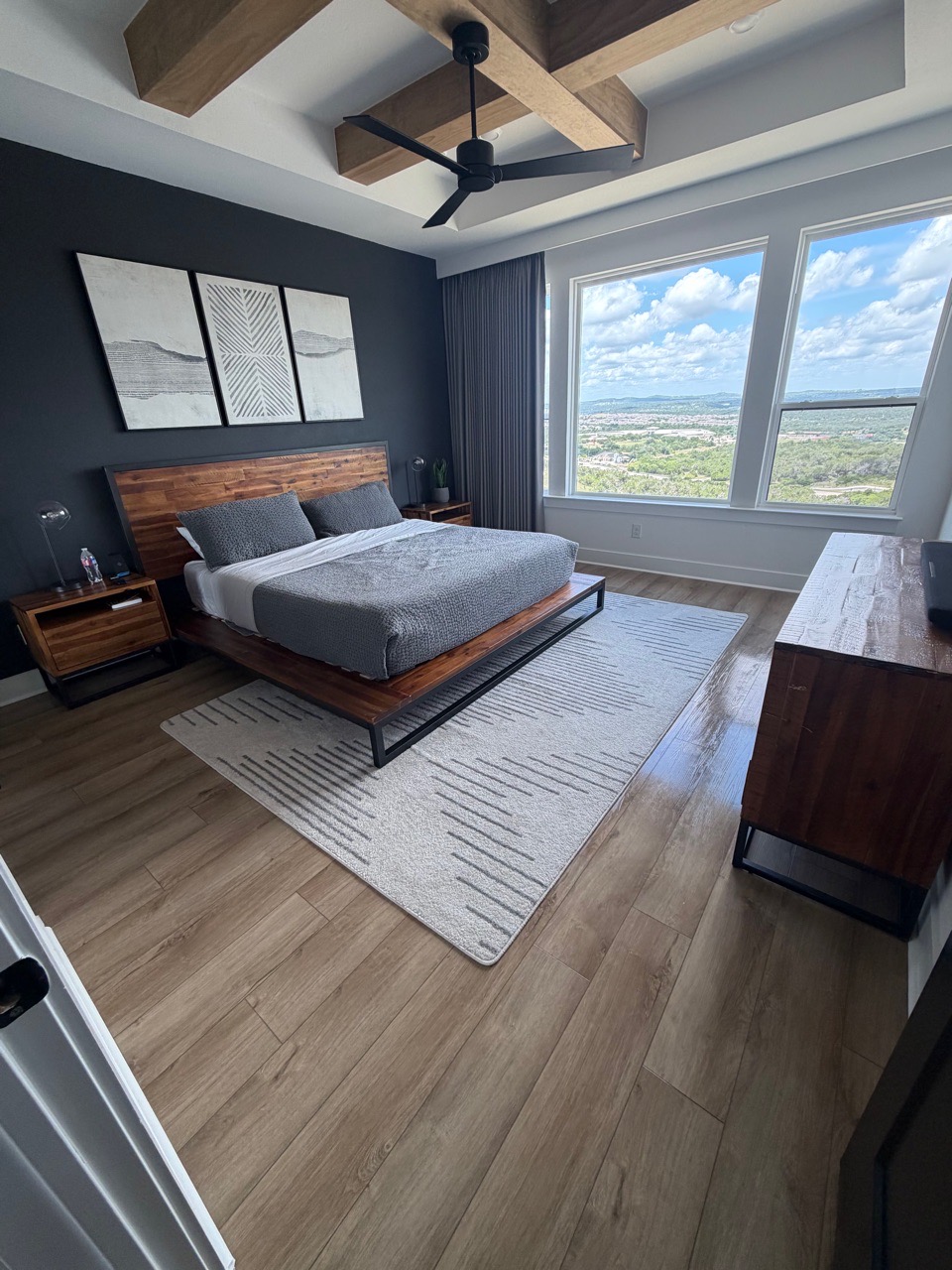
Guest-arrival bed staging
Note: Matches host-listing framing so it is obvious at a glance that staging meets expectations.
Reference photo, used with permission — not an NNT-completed job. Being replaced with an NNT example.
Kitchen (after) 2 photos
Source: checklists.html › Airbnb › Kitchen
- Counters and sink, clear of guest items
- Fridge exterior
3. Don't Miss
Laundry first, always
If the wash cycle does not start in the first five minutes, you will be racing the clock for the rest of the turnover.
Guest belongings check
Under beds, behind nightstands, bathroom shelves — a left-behind item found after checkout is a bad review the host will blame on the clean.
Outdoor is opt-in only
Patios, decks, hot tubs, and grills are out of scope by default. Only work them if the host's account explicitly says so.
4. Questions / Limits
Cleaner never contacts the host
All issues route through the NNT office, never directly to the host.
Outdoor areas out of scope by default
Only in scope when explicitly pre-agreed and noted in the host's account.
Photo counts are a draft
Exact photo counts on this page are a first-pass proposal, not yet an approved standard. Confirm with your office before treating a missing shot as a problem.
Anything outside this guide — flag it to your office before improvising. Never promise a customer scope that isn't on this list.